

Yes. Technical SEO for AI search still matters: Google says AI Overviews and AI Mode need no extra technical requirements beyond being indexed and snippet-eligible, and John Mueller says technical SEO will remain very relevant. Fix crawl access, rendering, indexing and status codes first, then check named mentions, not just rankings.
Key takeaways
- Google's documentation says a page must be indexed and eligible to appear in Search with a snippet to show in AI Overviews and AI Mode. Nothing else is added on top.
- Most AI crawlers measured in the Vercel and MERJ study fetch your HTML but do not run your JavaScript, so content that only exists after client-side rendering may be invisible to them.
- Allow the right bot for the right job: OpenAI says to allow OAI-SearchBot if you want to appear in ChatGPT search results.
- Broken URLs cost you more with AI crawlers than with Google: ChatGPT and Claude spent about a third of their fetches on 404 pages in that study.
- Prove the fix worked on named mentions: run the same buyer prompts before and after, on each engine, several times, and compare mention rate rather than ranking position.
Does technical SEO matter for AI search?
It does, and the sources that carry the most weight say so in plain terms. In a recent interview covered by Search Engine Journal, November 2026, Google's John Mueller said AI systems build on SEO. In his words: I think especially technical SEO is going to remain very relevant. He added that AI systems crawl slightly differently, because some crawl for training and others for fresh content, but he called that another flavour of technical SEO.
Google's own documentation points the same way. Its page on AI features says a page must be indexed and eligible to be shown in Google Search with a snippet. It also says: There are no additional technical requirements. (Google Search Central, checked November 2026). The same page lists the fundamentals that still apply: crawling allowed in robots.txt and by any CDN or hosting layer, internal links that make content findable, important content in text form, and structured data that matches the visible text.
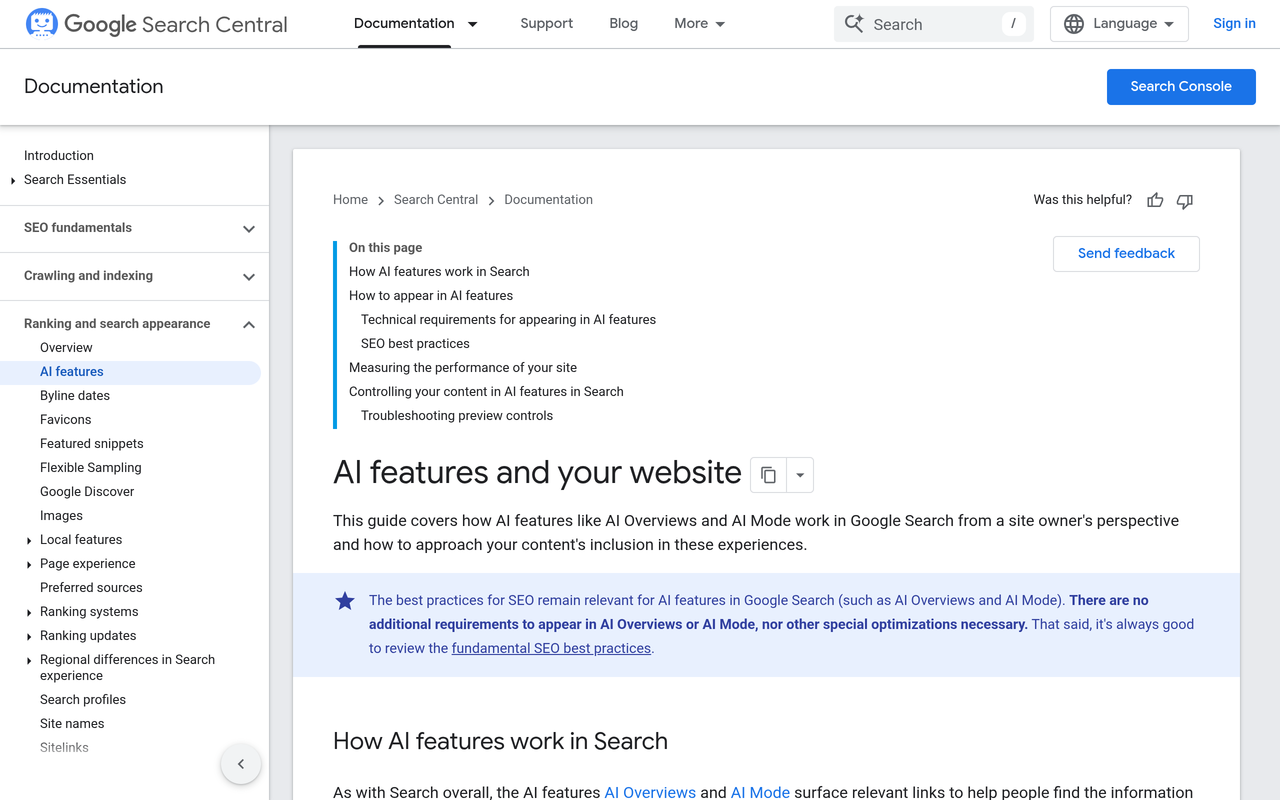
Two details matter for how you plan the work. First, Google states that you do not need new machine-readable files, AI text files or special schema.org markup to appear in its AI features. Second, it says that meeting every requirement does not guarantee crawling, indexing or serving. Technical SEO makes you eligible. It does not make you chosen.
That gap is where most teams go wrong. They fix the technical layer, see no change in a rank tracker, and conclude it did nothing. The effect, if there is one, shows up in whether engines name and cite you. The measurement section below covers that.
What technical SEO fixes help my site get cited by AI?
Work in the order a request travels: can the bot reach the page, can it read the page, is the page in an index, does the URL return a clean answer. A failure early in that chain makes later work irrelevant. This is the order we suggest, with a test you can run for each step.
| Order | Layer | What to check | Test you can run today |
|---|---|---|---|
| 1 | Crawl access | robots.txt rules per bot, plus CDN, WAF and bot-protection rules | Free AI crawler checker, then a request log search for the bot name |
| 2 | Rendering | Key text, headings, prices and links present in the raw HTML | View source, or fetch the URL with curl and search for a sentence from the page |
| 3 | Indexing | Indexable, canonical, not noindex, snippet allowed | Search Console URL Inspection; check robots meta and X-Robots-Tag |
| 4 | Status codes | 200 on live URLs, single-hop redirects, no soft 404s | Crawl the site and list 3xx and 4xx responses |
| 5 | Discovery | XML sitemap, internal links, no orphan pages | Compare sitemap URLs with a crawl of internal links |
| 6 | Page experience and markup | Structured data matches visible text; pages load fast | Free AI SEO checker for 30+ page checks |
Step 1: let the right bots in, and know which is which
A single blanket rule can block every AI product at once, and CDN bot protection can block bots that your robots.txt allows. Google's guidance names both robots.txt and CDN or hosting infrastructure for that reason.
Treat each OpenAI bot as a separate decision. OpenAI's crawler documentation, checked November 2026, says OAI-SearchBot is used to surface websites in ChatGPT's search features and recommends allowing it in robots.txt and allowing requests from its published IP ranges. GPTBot is the training crawler. Blocking GPTBot alone does not remove you from ChatGPT search. Our AI Crawler Policy Kit covers the three-way split between search, training and user-triggered fetches, and how ChatGPT search works shows how to confirm OAI-SearchBot is let through.
A minimal robots.txt that allows search and leaves training as a separate choice looks like this in principle: an Allow rule for OAI-SearchBot, and a Disallow or Allow rule for GPTBot that reflects your training policy. Keep the two rules separate and written out by name.
Step 2: put the answer in the HTML
Rendering is the fix with the biggest gap between Google and everyone else. Google renders JavaScript. Most AI crawlers do not. Vercel with MERJ, December 2024, analysed crawler traffic on nextjs.org and Vercel's network and found that none of the major AI crawlers it tested render JavaScript, including OpenAI's OAI-SearchBot, ChatGPT-User and GPTBot, Anthropic's ClaudeBot and PerplexityBot. Gemini was the exception because it uses Googlebot's infrastructure.
The same study found that ChatGPT's crawler requested JavaScript files in 11.50% of requests and Claude's in 23.84%, yet did not execute them. So a bot may download your bundle and still see an empty shell.
That study is nearly two years old, so treat it as a reason to test, not as a permanent fact. The test takes a minute:
- Pick the page you most want cited, such as a pricing page, a comparison or a definitive guide.
- Fetch the raw HTML with curl, or use view-source in a browser, not the inspector, which shows the rendered DOM.
- Search the output for one distinctive sentence, one price and one internal link.
- If any are missing, the page depends on client-side rendering. Move that content to server-side rendering or static generation.
Vercel also notes that content delivered in the initial HTML response, such as JSON data, may still be read. The rule of thumb: if it is in the first response from your server, the bot can see it.
Step 3: confirm indexing and snippet eligibility
For Google's AI features, eligibility is indexing plus snippet eligibility. Check URL Inspection in Search Console for the pages that matter. Look for stray noindex tags, a canonical pointing elsewhere, and preview controls such as nosnippet or restrictive max-snippet values that stop Google showing text from the page. Google also says to verify your site in Search Console to diagnose technical issues quickly.
For other engines, there is no equivalent console. Your evidence is your own server logs and the answers themselves.
Step 4: clean up status codes and redirects
This is the least discussed item on most checklists, and the Vercel data gives it weight. ChatGPT's crawler spent 34.82% of its fetches on 404 pages and 14.36% following redirects. Claude spent 34.16% on 404s. Googlebot spent 8.22% on 404s and 1.49% on redirects.
A worked example, using only those published rates. If each bot made 1,000 fetches to your site, ChatGPT would land on about 348 error pages and Googlebot on about 82. You cannot assume your site matches the study, but the direction is clear: AI crawlers waste more requests on dead URLs, so every stale URL you leave live competes with a page you want read. The study's analysis found many of these 404s were outdated static asset paths, so check old asset URLs and moved pages first.
Step 5: make discovery boring
Keep a current XML sitemap, link every important page from at least one crawlable page, and avoid pages reachable only by a script-driven menu or an internal search box. These are the same internal-link and findability basics Google lists for its AI features.
Do I need llms.txt, markdown pages or special schema?
For Google, no. Its documentation says you do not need new machine-readable files, AI text files or special markup to appear in AI Overviews and AI Mode. The Search Engine Journal report on Mueller's interview notes he has said there is no reason to create special markdown pages for Google's AI search.
That does not make an llms.txt file harmful. It is a low-cost summary of your key pages that some tools and agents may read, and a clean one doubles as a check that your important URLs resolve. Treat it as optional and last in the queue, after the five steps above. The free llms.txt generator and validator builds a file from your sitemap and validates the links, so you can see which listed URLs return errors. Our llms.txt guide explains what it can and cannot promise.
Schema works the same way: keep structured data accurate and matched to visible text, but do not expect a special AI markup to unlock citations.
How do I verify AI engines can actually fetch my pages?
Robots.txt tells you what a bot is told. Logs tell you what it did. Use three checks together.
- Policy check. Run the free AI crawler checker. It shows whether GPTBot, OAI-SearchBot, ClaudeBot, PerplexityBot and Google AI can crawl your site, and generates a corrected robots.txt.
- Request check. Search your server or CDN logs for each bot's user agent over the last 30 days. Note the response codes, not only the request counts. A bot that appears daily and receives 403 has the same effect as a bot that is blocked.
- Answer check. Ask the engines a question your page answers and look at the cited URLs. If the page is never cited and the bot is never in your logs, the problem is access. If the bot is in your logs and the page is still not cited, the problem is content or authority, not technical SEO.
That last distinction saves weeks. Technical fixes remove blockers. They cannot supply a reason to be quoted. Our guide to agent analytics explains how to separate training crawls, search crawls and user-triggered fetches in your own logs.
How do I confirm the effect on named mentions, not just rankings?
Rankings measure a list of links. AI answers are a sentence naming brands, so the metric is whether the sentence names you. Google's AI features are also folded into the overall Web search type in Search Console, so you cannot read AI-only effects from that report alone.
Use a before-and-after design on a fixed prompt set:
- Choose 20 to 30 unbranded buyer prompts, the kind covered in how to choose prompts to track.
- Run them on each engine you care about before you change anything. Record whether your brand is named, in what position, and which URLs are cited.
- Ship one technical change at a time, or a small batch with a clear date.
- Rerun the same prompts, from fresh sessions, the same number of times.
- Compare mention rate per engine. Call it a change only when it exceeds run-to-run noise.
The noise is real. Answers vary between runs, which is why AI citation stability matters before you credit a fix. A single rerun that shows you named once proves little.
| Metric | What it shows | When a technical fix should move it |
|---|---|---|
| Bot requests with 200 responses | Access restored | Within days, in your logs |
| Cited URL count from your domain | Engines can read and use your pages | After the next crawl or retrieval cycle |
| Mention rate per engine | Whether you are named | Slowest to move; needs repeat runs |
| Description accuracy | Whether the content engines read matches your facts | After corrected pages are fetched |
Read them left to right. Access moves first, citations second, mentions last. If access improves and mentions do not, the next job is content and third-party sources, not more technical work.
Where Noma fits
Noma by Nurdd asks 13 AI engines, including ChatGPT, Gemini, Perplexity and Claude, the buyer questions you choose, every day, and reports whether your brand is named, in what position, with what sentiment and which pages are cited. Its agent analytics shows which AI crawlers fetch each page, so you can line up a technical fix with the mentions that follow. Prompt tracking keeps the prompt set fixed.
See it on your own brand: book a demo or start the 3-day free trial. A card is taken at signup so billing can start on day 3; cancel before then and nothing is charged.
Common mistakes
- Blocking GPTBot and assuming ChatGPT search is off. Search uses a different bot, per OpenAI's documentation.
- Trusting robots.txt and ignoring the CDN. Bot protection can return 403 to a bot your robots.txt welcomes.
- Testing in a rendered browser. The inspector shows content a non-rendering crawler never sees.
- Starting with llms.txt. It is optional, and Google says no special AI files are needed.
- Judging success by rank alone. A page can hold position and still be absent from the answer.
How we researched this
We reviewed Google Search Central documentation on AI features, OpenAI's crawler documentation, the Vercel and MERJ crawler study, and Search Engine Journal's report of John Mueller's interview. We read the sources directly where they loaded and used search extracts where a page did not load in full. Facts, figures and Noma plan details were checked on 2026-11-09. We have not run our own crawler experiment for this post, and the Vercel figures date from December 2024, so verify rendering and 404 behaviour on your own site.
What to do next
Run the crawler checker and the raw-HTML test on your five most important pages this week, fix whatever fails, and write down your baseline mention rate before you ship. Then rerun it. To track the result daily across engines, book a demo or start the free trial.
See what AI engines say about your brand
Free · no account · or start a 3-day trial
Questions people ask
Does technical SEO matter for AI search?
Yes. Google's documentation says a page must be indexed and eligible to appear in Search with a snippet to show in AI Overviews and AI Mode, and John Mueller has said technical SEO will remain very relevant. Technical SEO makes you eligible to be read and cited, but it does not guarantee a mention.
What technical SEO fixes help my site get cited by AI?
Start with crawl access for each bot, including CDN rules, then put key content in the server-sent HTML, confirm pages are indexable, and remove 404s and redirect chains. Add a clean sitemap and internal links last. Then track named mentions on a fixed prompt set to see whether the fixes changed the answers.
Do AI crawlers render JavaScript?
In the Vercel and MERJ study from December 2024, none of the major AI crawlers tested rendered JavaScript, though Gemini used Googlebot's infrastructure and could. Test your own pages by searching the raw HTML for a distinctive sentence, since crawler behaviour can change.
Do I need an llms.txt file to appear in AI answers?
Google says you do not need new machine-readable files or AI text files to appear in AI Overviews and AI Mode. An llms.txt file is optional and worth doing after crawl access, rendering and indexing are sound.
Will blocking GPTBot remove my site from ChatGPT search?
No. OpenAI documents OAI-SearchBot as the bot used to surface sites in ChatGPT's search features, and recommends allowing it in robots.txt. GPTBot is a separate training crawler, so decide the two rules independently.
How do I know if a technical fix improved my AI visibility?
Run the same buyer prompts on each engine before and after the change, several times each, and compare how often your brand is named. Treat a change as real only if it is larger than the variation between repeat runs. Check bot requests and cited URLs too, since they usually move before mentions do.