

A ChatGPT agent blocked from your site has one of two causes: something in your own stack refuses it (robots.txt, a firewall or CDN rule, a bot challenge), or an OpenAI-side site-safety check stops the request before it leaves OpenAI, so nothing appears in your logs. You can tell them apart with a log search and a same-session control test.
Key takeaways
- Your logs prove a block only when they show a request that got a 403, a challenge or a WAF event. A missing request points upstream of your site.
- robots.txt cannot override a firewall rule, and OpenAI says robots.txt rules may not apply to ChatGPT-User, so a clean robots.txt is only half the check.
- Search Engine Journal reported an OpenAI-side site-safety check (called Aura in OpenAI's systems) that blocked one publisher's domain even though its robots.txt was open. OpenAI does not document how it works or offer an appeal form.
- Run the same URLs across ChatGPT live fetch, the cloud browser and Codex Browser Use, with two or three competitor sites as controls in the same session.
- Keep an evidence pack and retest on a schedule. A block can clear or return, and a drop in AI mentions is often the first visible sign.
Why can't ChatGPT browse my website?
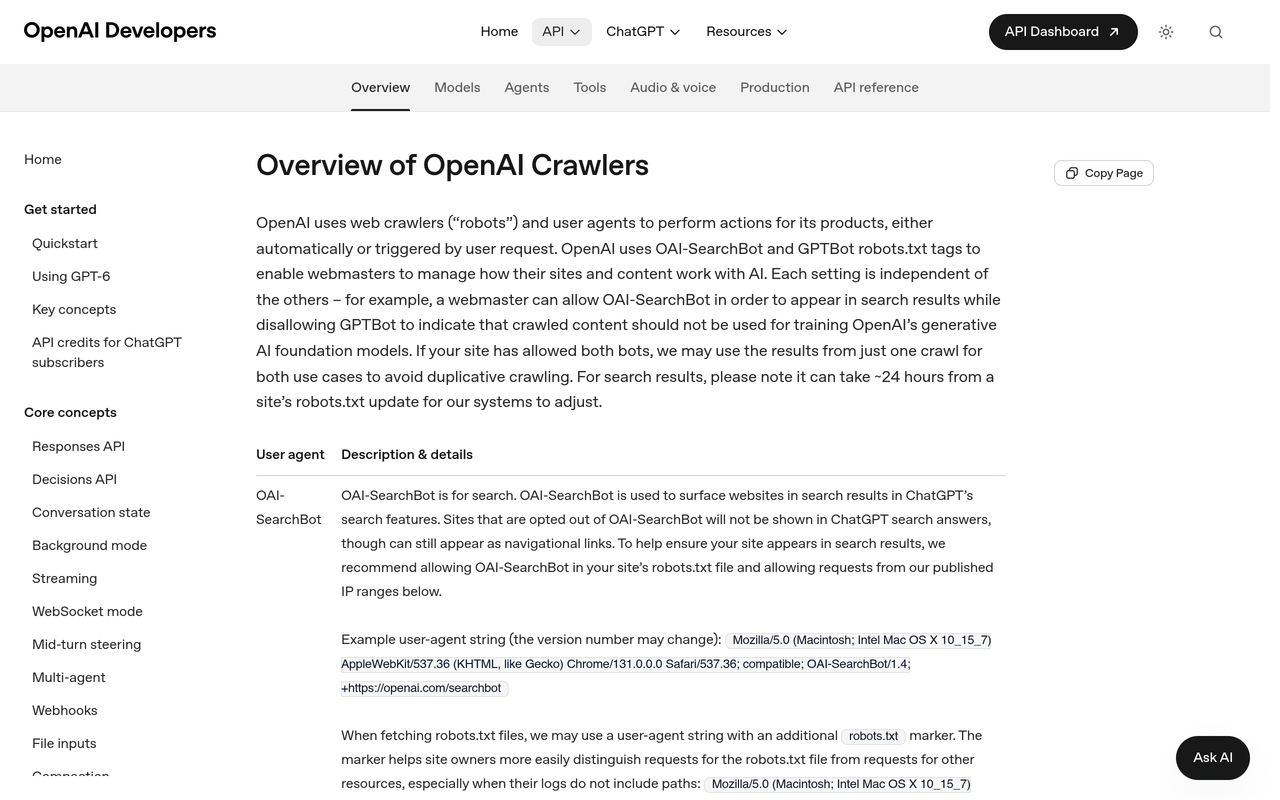
ChatGPT reaches a site through several separate mechanisms, and each fails for different reasons. OpenAI Developers, October 2026 documents three user agents: OAI-SearchBot (surfaces sites in ChatGPT search), GPTBot (training), and ChatGPT-User (certain user actions in ChatGPT and Custom GPTs). OpenAI's page says ChatGPT-User is not used for automatic crawling and, because a person starts the action, robots.txt rules may not apply.
Agents add a second layer. Search Engine Journal, October 2026 reports that OpenAI runs a central site-safety check, named Aura in its systems, that decides whether browsing tools may open a domain. Per that article, a flagged site is refused by tools such as Codex Browser Use and ChatGPT live search, regardless of local user settings and robots.txt, and the decision is cached locally for 24 hours.
So when someone says ChatGPT cannot browse a site, there are four places to look:
- Your robots.txt (a request you make to crawlers).
- Your firewall, CDN or bot-management rules (an enforcement layer that never reads robots.txt).
- Bot verification, where your edge cannot confirm a request is really from ChatGPT and challenges it.
- An OpenAI-side classification of your domain, which you cannot see or edit.
How does an OpenAI-side block hide from your logs?
An OpenAI-side block stops the attempt before any HTTP request is sent to your server, so there is nothing to log. Search Engine Journal's author, Dan Taylor, described a publisher where ChatGPT failed to load pages from May 2026 while server logs showed no traffic from ChatGPT reaching the site. The tool's message was explicit: "The site-safety policy blocks this action" (Search Engine Journal, October 2026).
That publisher's own crawler stats were thin too. The article reports roughly 5,000 successful requests served to OpenAI's training crawlers in 30 days, against 477,000 for Google and 564,000 for Anthropic. Open robots.txt and healthy 2xx responses to the OpenAI bots did not help, because the agent block sat upstream.
Treat this as one reported case, not a measured prevalence. The article says the trigger is unknown, that OpenAI support confirmed an internal review of whether the block was expected, and that there is no public review process. Do not assume your site is affected until the checks below say so.
How do I check if ChatGPT crawlers are blocked on my site?
Work from the cheapest, most likely cause to the least likely. Most blocks are self-inflicted.
Step 1: Read robots.txt for the right user agents
Open yourdomain.com/robots.txt on the exact hostname your site serves (with or without www). Look for these patterns:
- A Disallow of / under User-agent: OAI-SearchBot stops ChatGPT search from listing you.
- A Disallow of / under User-agent: * covers every bot the file does not name individually, including OpenAI's.
- A Disallow under GPTBot affects training only. It does not remove you from ChatGPT search.
Blocking GPTBot and OAI-SearchBot together is common. A DEV Community test, October 2026 of 894 sites that returned a normal page found 8.9% blocked at least one AI search bot in robots.txt, and 45% of sites blocking GPTBot also blocked OAI-SearchBot. The Free AI Crawler Checker from Noma by Nurdd tests GPTBot, OAI-SearchBot, ClaudeBot, PerplexityBot and Google AI against your robots.txt and generates a corrected file. For the policy side, see the AI Crawler Policy Kit.
Step 2: Check firewall, WAF and CDN rules
A firewall refuses a request before robots.txt is consulted. The same DEV Community test found 2.3% of sites refused AI search bots at the firewall or CDN while robots.txt allowed them. Check these, in order:
- Managed bot rules and "block AI bots" toggles. Cloudflare is replacing its single Block AI Bots setting with separate Search, Training and Agent controls, so confirm which of the three is active (Cloudflare, 2026).
- Rate limits and country rules that catch cloud IP ranges.
- JavaScript or CAPTCHA challenges applied to unrecognised user agents.
- Hosting-level protection that sits ahead of your CDN.
Step 3: Verify bots instead of blocking them
Bot-management tools block unverified automation by default, so a real ChatGPT request can look like a fake one. OpenAI publishes IP lists for OAI-SearchBot (openai.com/gptbot.json) and ChatGPT-User (openai.com/chatgpt-user.json) on its crawler page. For agent traffic, the OpenAI Help Centre, as checked November 2026 says the cloud browser signs outbound requests with Web Bot Auth (HTTP Message Signatures, RFC 9421), with a Signature-Agent header of "https://chatgpt.com" and public keys at chatgpt.com/.well-known/http-message-signatures-directory. The same page says Cloudflare recognises it as a signed agent with the bot tag chatgpt-agent.
If your edge does not recognise signed agents automatically, verify the signature yourself and allow only requests that pass. Do not allowlist by user-agent string alone: it is trivially faked.
Step 4: Test whether ChatGPT can actually retrieve your pages
Config checks tell you what should happen. A retrieval test tells you what does. Pick five URLs: homepage, a product or service page, a pricing page, a deep article and a subdomain page. Then:
- Ask ChatGPT to open each URL by name and summarise it. Note the exact error wording and the time, with time zone.
- Repeat in ChatGPT's cloud browser and, if your team uses it, Codex Browser Use.
- In the same session, ask it to open two or three competitor sites as controls.
- Search your logs for the timestamp of each attempt.
Search Engine Journal lists wording variants that signal a platform-side refusal, including "Browser use is not permitted on" followed by the domain and "URL cannot be opened (non-retryable error)". A generic "couldn't load" message is weaker evidence and can also be a slow server or a challenge page.
Is the block yours or OpenAI's? A decision table
Use this to read your results. It extends the checklist in the Search Engine Journal article with the log signature for each case.
| What you see | Log footprint at the attempt time | Likely location | Next action |
|---|---|---|---|
| OAI-SearchBot or GPTBot named in a Disallow rule | Requests for robots.txt only | Your robots.txt | Edit the file, retest with the crawler checker |
| Bot requests with 403, 429 or 503 | Request present, error status | Your firewall, WAF or rate limit | Add a verified-bot exception |
| Bot requests returning a 200 on a challenge page | Request present, small response body | Your bot challenge | Exempt verified OpenAI traffic from the challenge |
| Request present, 200 with full HTML, but the page is empty in ChatGPT | Request present, normal response | Page rendering (content loaded by JavaScript) | Serve key facts in the initial HTML |
| Refusal message, no request, controls load, all your URLs fail | No request at the timestamp | OpenAI-side site-safety check (as reported) | Build an evidence pack, open a support case |
| Refusal on some hostnames only | No request on failing hosts | Possible hostname-level classification | Test subdomains and any partner-hosted copy |
The log search is the deciding step. Filter by the user agents OAI-SearchBot, ChatGPT-User and GPTBot, and by the published IP ranges, for the minute of each failed attempt. A WAF event or status code means the block is yours. Silence, combined with refusals that name a policy and controls that load, matches the pattern Search Engine Journal described.
What should I do if the block is on OpenAI's side?
There is no self-service fix. Search Engine Journal, October 2026 recommends an evidence pack, support cases with kept case numbers, and three specific questions to OpenAI: whether the domain has a site-safety classification and why, which surfaces it affects, and how to request a review. Add these practical points:
- Include screenshots with timestamps, the control results, log extracts showing no inbound request, crawler analytics showing 2xx responses to OpenAI bots, and your robots.txt.
- Raise the case through any account contact you hold, such as an advertiser or partner relationship, as well as through support.
- Do not try to get round the block. OpenAI's usage policies prohibit bypassing safety mitigations, and workarounds risk turning a false positive into a justified one.
- Retest the same five URLs weekly and log the results, so you know when it clears.
The Help Centre article cited by Search Engine Journal says agents may be blocked from some sites for security, safety and compliance reasons. If your site handles anything an automated safety system might misread (user-generated content, file hosting, affiliate redirects), clean that up while the case is open.
How do I tell whether the block is costing me AI mentions?
Access checks are binary. Visibility is a trend, and that is where monitoring helps. When an agent cannot open your pages, Search Engine Journal, October 2026 argues it builds answers from secondary sources, forum posts and older articles, and competitors that load win by default. That argument is the publisher's reading, not a measured result, so test it on your own prompts.
A simple measurement design:
- Fix 20 to 30 unbranded buyer prompts. Do not change them mid-test (see which prompts to track).
- Record, per run, whether your brand is named, whether your URL is cited, and which domains are cited instead.
- Run each prompt several times and compare before and after the date you first saw refusals. Answers vary run to run, so judge a change only when it exceeds that noise (AI citation stability).
- If mentions fall while cited sources shift to third parties describing you, add a retrieval test to this week's checks.
A mention drop alone does not prove a block. Model updates, competitor content and prompt wording move the numbers too (what a new model release changes). A drop plus failed retrieval tests plus no log footprint is a much stronger signal.
Where Noma fits
Noma by Nurdd is an answer engine optimisation platform that asks 13 AI engines, including ChatGPT, Gemini, Perplexity and Claude, your buyers' questions every day and records whether your brand is named, how high, with what sentiment, and which sources the answers cite. Its agent analytics reads your server logs to show which AI agents fetch your pages. Noma cannot see inside OpenAI's site-safety check, but it shows the visibility effect and the log side.
See it on your own brand: book a demo or start the 3-day free trial. A card is taken at signup so billing can start on day 3; cancel before then and nothing is charged.
Which free checks should I run first?
Start with the Free AI SEO Checker, which runs 30+ checks on whether ChatGPT, Claude, Perplexity and Google AI Mode can read your site, and lists the top fixes. Follow with the AI Crawler Checker for per-bot robots.txt results. Neither tool can detect an OpenAI-side classification, because that decision is not exposed publicly. They clear your own stack so that any remaining failure is more clearly upstream.
A short weekly routine keeps it honest:
- Monday: retrieval test on five URLs, plus controls, with errors and timestamps saved.
- Monday: log search for OAI-SearchBot, ChatGPT-User and GPTBot status codes.
- After any CDN, WAF or bot-rule change: rerun the crawler checker.
- Monthly: compare mention rate and cited sources on your fixed prompt set.
For the wider crawler picture, read how to rank in ChatGPT and how AI engines decide which sources to cite.
What are the limits of this guide?
- The Aura check is documented publicly only through Search Engine Journal's reporting of one publisher's case and network traffic. OpenAI has not published how it works, what triggers it or a review process.
- OpenAI's crawler documentation and the Help Centre articles change. Recheck user-agent strings, IP files and signature details before changing firewall rules.
- Test results from one session on one day are evidence, not proof. Repeat across days and surfaces.
How we researched this
We reviewed OpenAI's crawler documentation and Help Centre allowlisting page, Search Engine Journal's report on the site-safety check, a published test of 894 sites, and Cloudflare's bot-control documentation. We did not run our own tests on OpenAI's systems, and we have no case data of our own. Facts, figures and product details were checked on 2026-11-01.
Next steps
Run the retrieval test on five URLs today, search your logs for the failed timestamps, and sort the result with the decision table. Then put the same prompts on a daily schedule so you see the effect on mentions. Book a demo or start the free trial to track it across 13 AI engines.
See what AI engines say about your brand
Free · no account · or start a 3-day trial
Questions people ask
Why can't ChatGPT browse my website?
Either your own setup refuses it (a robots.txt Disallow, a firewall or CDN rule, or a bot challenge) or an OpenAI-side site-safety check blocks the domain before any request reaches you. Check your logs for the failed attempt: a 403, challenge or WAF event means the block is yours, while no request at all points upstream.
How do I check if ChatGPT crawlers are blocked on my site?
Read robots.txt for OAI-SearchBot, GPTBot and User-agent: * rules, then review firewall, WAF and CDN bot settings. Next, ask ChatGPT to open five of your URLs, note the errors and search your logs for those timestamps. The free AI Crawler Checker from Noma by Nurdd tests the robots.txt side per bot.
Does blocking GPTBot stop ChatGPT from citing my site?
No. OpenAI documents GPTBot for training and OAI-SearchBot for ChatGPT search, and they are controlled separately in robots.txt. A DEV Community test of 894 sites found 45% of those blocking GPTBot also blocked OAI-SearchBot, which does remove them from search results.
Does robots.txt control ChatGPT-User?
OpenAI's documentation says robots.txt rules may not apply to ChatGPT-User, because a person starts those actions. OpenAI points to OAI-SearchBot for managing search opt-outs. To enforce a block on any user-initiated fetcher, use your firewall or CDN.
Can OpenAI block my site from ChatGPT agents without telling me?
Search Engine Journal reported that a central site-safety check can stop ChatGPT's browsing tools opening a domain, with no request in the owner's logs and no public appeal process. It was documented for one publisher, and OpenAI has not published how the check works.
How do I verify that a request really comes from ChatGPT?
OpenAI publishes IP lists for OAI-SearchBot and ChatGPT-User, and its cloud browser signs requests with Web Bot Auth (RFC 9421) using a Signature-Agent header of https://chatgpt.com. Verify the signature against the public keys rather than trusting the user-agent string, which can be faked.
How can I tell if a block is hurting my AI visibility?
Track a fixed set of buyer prompts daily and watch mention rate and cited sources, then compare against your retrieval test results. A mention drop, failed retrieval and no log footprint together suggest an access problem rather than normal answer variation.